
完美解决:内置硬盘被Win10识别为可删除设备的问题!

1,429 views次阅读
3 条评论

缘起

完美解决:内置硬盘被Win10识别为可删除设备的问题!

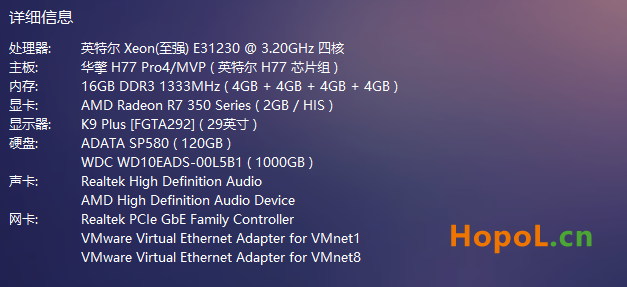
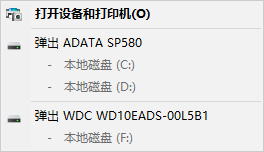
一套老爷机,平时很少开,今天重装了win10系统,感觉这个窗口有点碍眼!!!(以前也有但为啥不觉得碍眼呢,奇怪了)

完美解决:内置硬盘被Win10识别为可删除设备的问题!

就上网搜索一下,找到了完美解决方案。

设置过程

查询 Bus Number

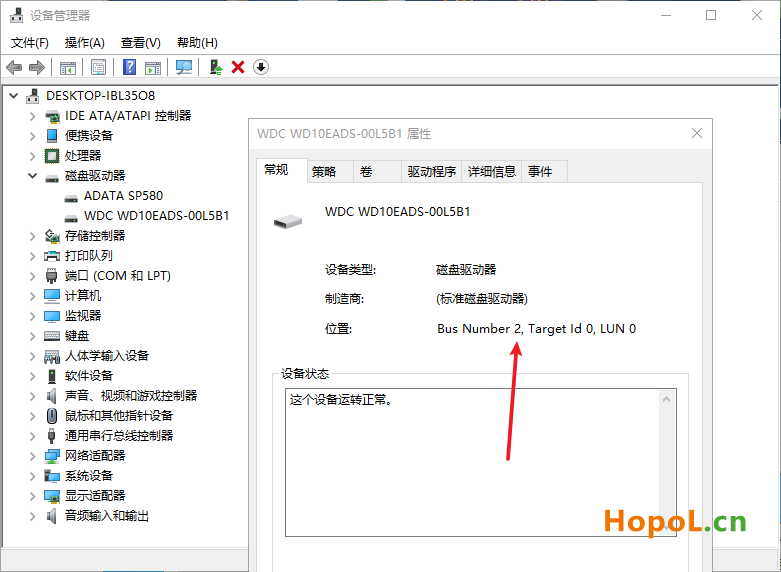
打开 “设备管理器”--- “磁盘驱动器” --- 对应硬盘右键“属性”,

在“常规”选项下,找到对应的 Bus Number 的值。(下图Bus Number = 2)
完美解决:内置硬盘被Win10识别为可删除设备的问题!

如我这台老爷机两个硬盘:

ADATA SP580, Bus Number = 0

WDC WD10EADS-00L5B1, Bus Number = 2


修改注册表

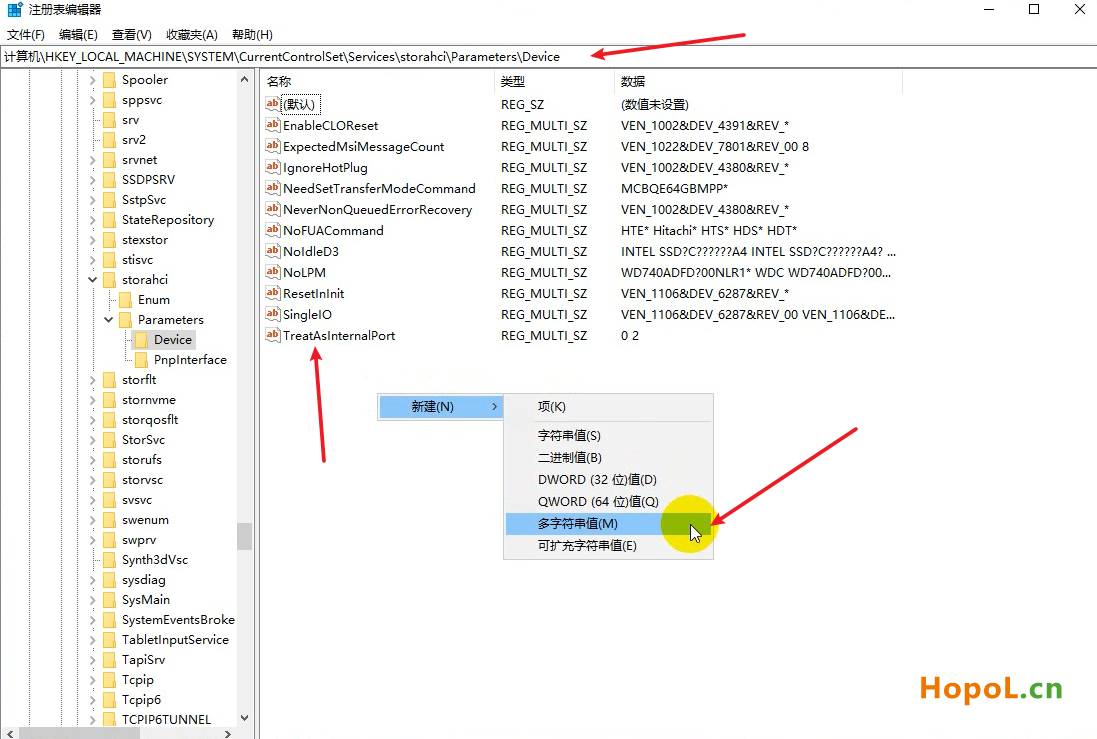
打开 “注册表编辑器”找到:

HKEY_LOCAL_MACHINE\SYSTEM\CurrentControlSet\Services\storahci\Parameters\Device

右边空白处,右键新建 --- > 多字符串值 

名为:TreatAsInternalPort
完美解决:内置硬盘被Win10识别为可删除设备的问题!


如上将填入 0 2 ,填入的时候 注意 每个数字后面+(回车),

数字数据:0(回车)2(回车),然后点确定。


【小学生程度,不知道如何表达,每个数字后面需要加入”回车换行符“】
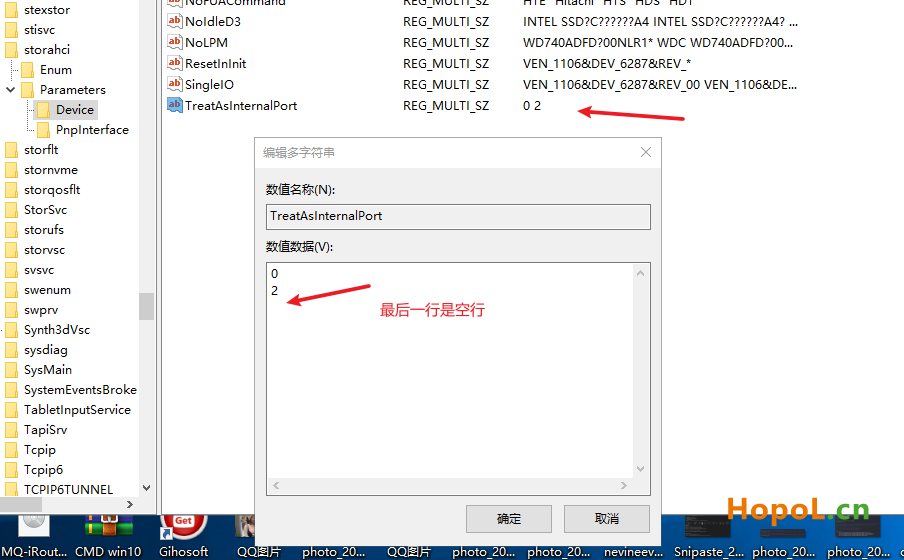
完美解决:内置硬盘被Win10识别为可删除设备的问题!

重启

重启之后 ,整个世界 ,都清静了 !!!

正文完
 0
HopoL
版权声明:本站原创文章,由 HopoL 于2021-07-24发表,共计475字。
转载说明:除特殊说明外本站文章皆由CC-4.0协议发布,转载请注明出处。
评论(3 条评论)
番茄 评论达人 LV.1
2021-07-25 12:59:17 回复

点赞 正需要

 Windows  Chrome  中国江苏省苏州市电信
冷水烫猪 评论达人 LV.1
2021-09-18 10:13:24 回复

一般是因为BIOS设置SATA设备(对应硬盘的接口)为热插拔,禁止热插拔就不会被Windows识别为可删除设备了。BIOS里的SATA设置里面,Hot swapping 或 Hot plugging。

 Windows  Firefox  中国四川省成都市电信

HopoL's Blog

文章搜索
最新评论
Metaldololity Metaldololity Whoa, that's really simple. You just save my time a lot. Thankyou!
HopoL HopoL Since you’ve got the backup, it’s actually pretty simple. Just restore the backup files to your new flash drive, then head over to the /config directory and edit the go file. Look for export UNRAID_GUID=xxxxxxxxxxxxxx and swap it with your new drive's GUID. That should do the trick!
Metaldololity Metaldololity Really apreciate for your fast respond, mate. I actually have the backup of the flashdrive (from regular unraid backup). The problem is, when i search on youtube tutorial about changing the failed flashdrive, the process need some sort of confirmation with an account in unraid (blacklist the old one -> whitelist the new one). Since i have a cracked unraid, i don't know how to register my new flashdrive as the correct one (and the system not asking me for the old failed flashdrive). Thanks in advance
HopoL HopoL Man, that's a tough spot to be in. Regularly backing up your /boot folder is super important for exactly this reason. If you don't have a backup and your flash drive is completely fried, your best bet is to Google some specific recovery guides or check the Unraid forums. There are ways to rebuild your config by identifying your parity and data drives, but it can be a bit of a process. Hope you can get it sorted!
Metaldololity Metaldololity Hi! Huge thanks for the update on 7.2.0. I have question here, my flashdrive corrupted. how do i install it on the new flashdrive without losing all my configuration?