ProXmoX VE 添加物理硬盘到虚拟机

34,044 views次阅读
4 条评论

提醒:本文最后更新于2025-06-19 10:40,文中所关联的信息可能已发生改变,请知悉!

参考文献

http://everun.top/helpcenter/others/pve-ow-8.html

食用方式

[hermit autoplay="true" mode="circulation" preload="auto"]netease_songlist#:525278413[/hermit]


创建KVM虚拟机

先创建好虚拟机,然后再添加物理磁盘。

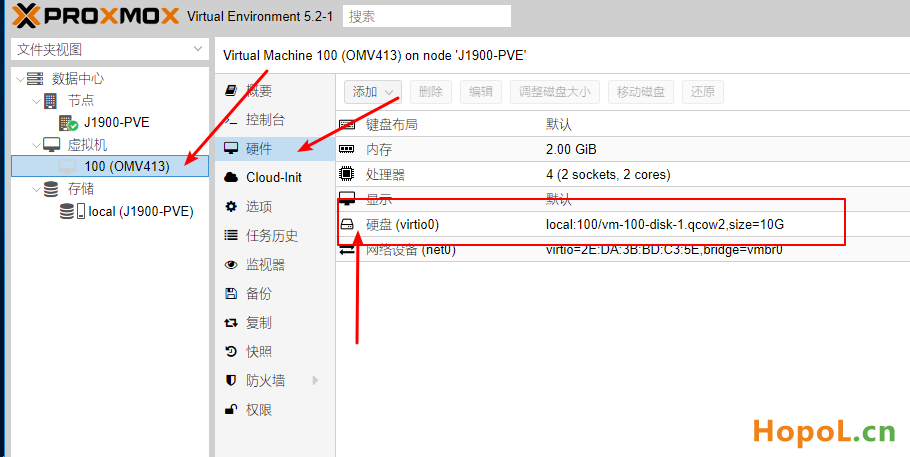
查看当前虚拟机使用的硬盘总线接口及其编号,别一会添加的时候重复了。
ProXmoX VE 添加物理硬盘到虚拟机

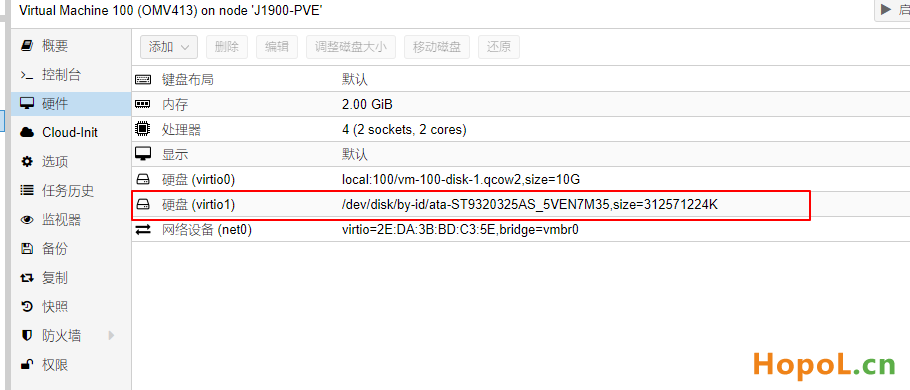
我这里的用OMV举例,硬盘使用 virtio 0,下面添加硬盘的时候 就要改成 virtio 1。避免磁盘编号重复。


获取物理磁盘信息

  1. WebUI方式获取

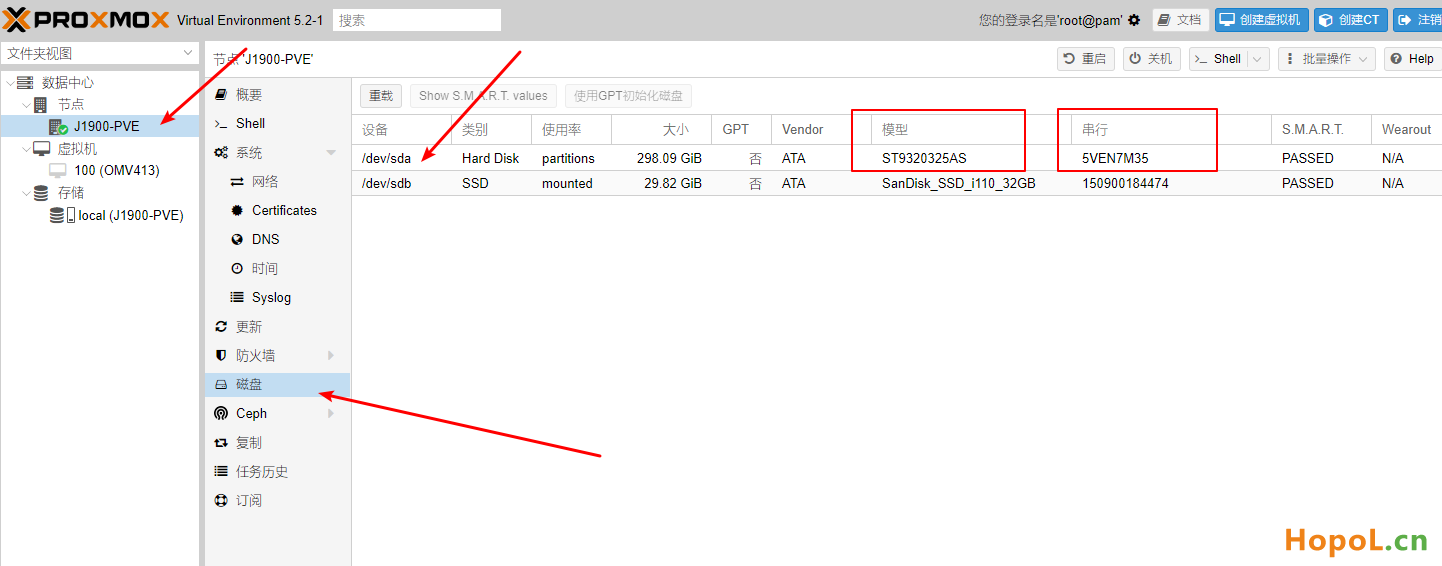
在添加物理磁盘之前,需要先确认其标识(ID)信息,然后根据此信息来确认其设备文件的路径和名称。
ProXmoX VE 添加物理硬盘到虚拟机

如上图:ST93320325AS 这块硬盘

Model:ST93320325AS

Serial:5VEN7M35


2. CLI方式获取

在shell下输入:

#安装 lshw

apt-get update

apt-get install lshw


#磁盘ID来列出所有的磁盘设备

lshw -C storage -C disk
ProXmoX VE 添加物理硬盘到虚拟机

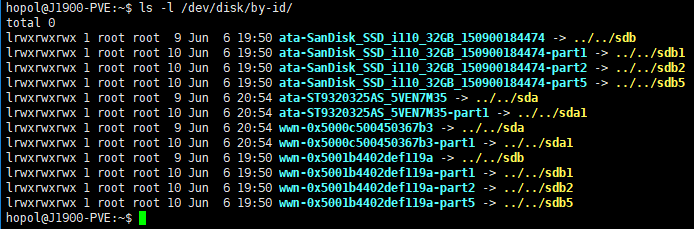
ata 表示接口方式,通常有ATA、SATA,SCS和SASI等类型。IDE和SATA接口一般为“ata”,SCSI及SAS接口一般为”scsi“。

也可以用 ls -l /dev/disk/by-id/ 查看


添加物理磁盘到虚拟机中

需要在shell下通过CLI的方式来添加,

使用的工具为qm(Qemu/KVM虚拟机管理器),

通过命令”set“来设置物理磁盘到虚拟机中。

qm set <vm_id> --<disk_type>[n] /dev/disk/by-id/<type>-$brand-$model_$serial_number


vm_id : 之前创建虚拟机时指定的。

<disk_type>[n] : 磁盘的总线类型及其编号,总线类型可以选择IDE、SATA、VirtIO Block和SCSI类型,编号从0开始,最大值根据总线接口类型有所不同,IDE为3,SATA为5,VirTIO Block为15,SCSI为13。

”/dev/disk/by-id/<type>-$brand-$model_$serial_number” : 为磁盘ID的具体路径和名称。

按照我硬盘的参数举例:

qm set 100 --virtio1 /dev/disk/by-id/ata-ST9320325AS_5VEN7M35
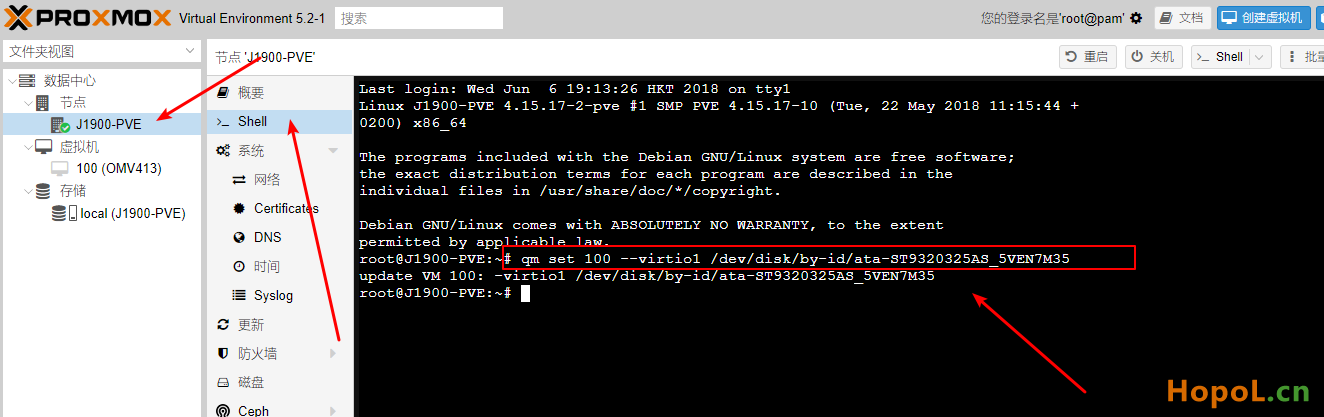
ProXmoX VE 添加物理硬盘到虚拟机


检查和确认

ProXmoX VE 添加物理硬盘到虚拟机


-End-

正文完
 0
HopoL
版权声明:本站原创文章,由 HopoL 于2018-06-06发表,共计1020字。
转载说明:除特殊说明外本站文章皆由CC-4.0协议发布,转载请注明出处。
评论(4 条评论)
4sura 评论达人 LV.1
2018-07-25 10:00:50 回复

这种方式硬盘好像不能实现硬盘休眠

 Windows  Chrome  中国广东省广州市电信
剁喵 评论达人 LV.1
2019-03-08 13:18:05 回复

请教一下pve下 虚拟群辉 直通sas卡上的sas硬盘可以么?

 Windows  Chrome  中国香港和记电讯

HopoL's Blog

文章搜索
最新评论
Metaldololity Metaldololity Whoa, that's really simple. You just save my time a lot. Thankyou!
HopoL HopoL Since you’ve got the backup, it’s actually pretty simple. Just restore the backup files to your new flash drive, then head over to the /config directory and edit the go file. Look for export UNRAID_GUID=xxxxxxxxxxxxxx and swap it with your new drive's GUID. That should do the trick!
Metaldololity Metaldololity Really apreciate for your fast respond, mate. I actually have the backup of the flashdrive (from regular unraid backup). The problem is, when i search on youtube tutorial about changing the failed flashdrive, the process need some sort of confirmation with an account in unraid (blacklist the old one -> whitelist the new one). Since i have a cracked unraid, i don't know how to register my new flashdrive as the correct one (and the system not asking me for the old failed flashdrive). Thanks in advance
HopoL HopoL Man, that's a tough spot to be in. Regularly backing up your /boot folder is super important for exactly this reason. If you don't have a backup and your flash drive is completely fried, your best bet is to Google some specific recovery guides or check the Unraid forums. There are ways to rebuild your config by identifying your parity and data drives, but it can be a bit of a process. Hope you can get it sorted!
Metaldololity Metaldololity Hi! Huge thanks for the update on 7.2.0. I have question here, my flashdrive corrupted. how do i install it on the new flashdrive without losing all my configuration?